


Hello!
I'm sorry to say that's not possible. Flash content is no longer available.
LMK what you need the Flash for. Perhaps I can help.
Best,
Gil

 Some of my students are not able to record themselves or save their recordings while a few can. Can someone help me?
I have an assignment and only a few students were able to record, save their recording, and submit. I have quite a few students who can not record. I was wondering if anyone can help?
For those schools that implement domain based limitations on incoming traffic, please tell your IT department to whitelist *.voki.com & *.oddcast.com domains.

Why doesn't my youtube video play automatically when I play my presentation?
I have created a 3 slide presentation that has a youtube video on the second slide. When I play the presentation, the video does not play automatically. Why is that? What should I do?
Hello Sams!
Voki Presentations are designed to auto-play the Voki character when a slide is entered.
Thus it was deemed best not to auto-play a video, if a video is embedded in the page.
The video will play (of course) when you click the play button in the video.
I hope this helps. Regards,
Gil
The Voki Team
 How do I hide an assignment?
I can not find nor do I see the purple eye to hide the assignment

Hi,
Hope you are doing well
To hide your assignment, you will need to simply follow the below steps:
- Login to your voki account
- Go to CLASSROOM and then choose CLASSES section. Here is the screenshot for reference: https://prnt.sc/1047c75
- In CLASSES section, you will see the assignments assigned to the classes. In front of all the assignment, you will notice an option saying ARCHIVE, here is the screenshot for reference: https://prnt.sc/1047cor
- Simply mark this archive option if you want to hide the assignment
Hope it helps
Please feel free to write us email to support@voki.com for any further queries
Best regards
Gurpreet

faturalama ve hesap bilgisi
ben voki ücretsiz deneme testini kullanıyordum ama bankadan gelen mail de 39 dolar kesinti yapıldığı belirtildi. ama ben kayıt sırasında aylık 4.99 dolar yazıyordun ben seviye 1 i seçmiştim o da aylık 4.99 olarak yazıyor belirtilmiş. lütfen gereken düzeltmeyi yapar mısınız
Hello!
I referred this issue to our support team (yesterday) - they should have already gotten back to you.
I am sure it will be cleared up if it has not been already.
Best regards,
Gil
The Voki Team
--------------------------------
Merhaba!
Bu sorunu destek ekibimize ilettim (dün) - zaten size geri dönmüş olmalıydılar.
Daha önce yapılmadıysa temizleneceğine eminim.
Saygılarımla,
Gil
Voki Ekibi

sign up
I am trying to sign up. I wrote my e mail adress but I haven't received any registration e mail. I checked my unwanted and spam mail but there isn't too. So how can ı register
If you wrote to support - they will surely respond & advise better than I can here, as they can lookup the specifics if needed.
But as a rule of thumb - problems during registration can be due to -
a. You may already be registered. This could happen if you had a Voki account before, or if you started registration process before, but only went "half-way" - completing personal details but not the account setup.
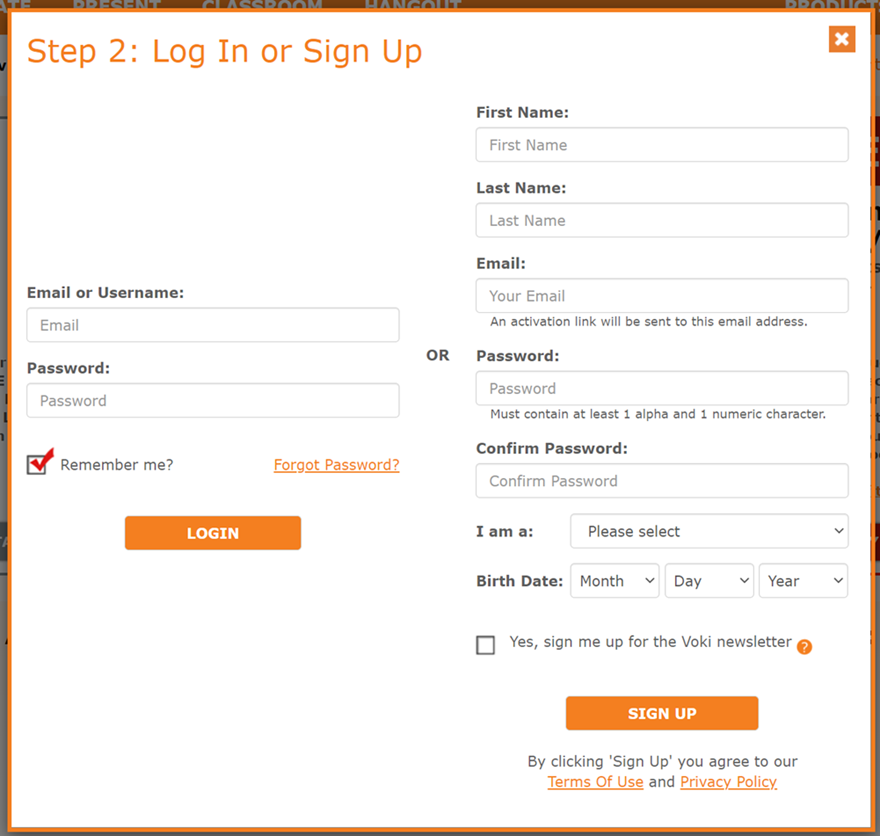
In such a case - choose the "login" option on the left to continue. (see image below)
b. possible technical issue due to numerous attempts
Try clearing your browser cache or using a different browser.
c. we've seen issues related to automatic translation. I believe that all such issues have been corrected in the past - but it is always possible that there is a problem we don't know about. If you are using auto-page translation, try to turn it off during sign up, and see if it helps. Let us know if this is the case.
Good luck,
Gil
The Voki Team

Receipt
Can I have the receipt for the credit card pre-authorisation?
I have an account on sitepal
Please send a note to support & our team will help you out.
Best,
Gil
Voice Speed
There used to be a toggle that would allow the user to slow the speaking voice down; is there still an option of that in the sound settings?
Hi Sandra -
you would need to open the FX menu to select the "slow" effect.
Hope this helps.
Best regards
Gil
The Voki Team
Can I import my own cartoon character into Voki and animate it?
I have a few cartoon characters that I would like to animate and give voices to. Is this possible in Voki?
Thanks
Customer support service by UserEcho